Gtk4
Дописи
26.07.2026 14:12 Gtk4
Розробка програм на C# з графічним інтерфейсом Gtk4 | Template - Шаблони
Приклад використання шаблонів Template з автоматичним зв'язуванням
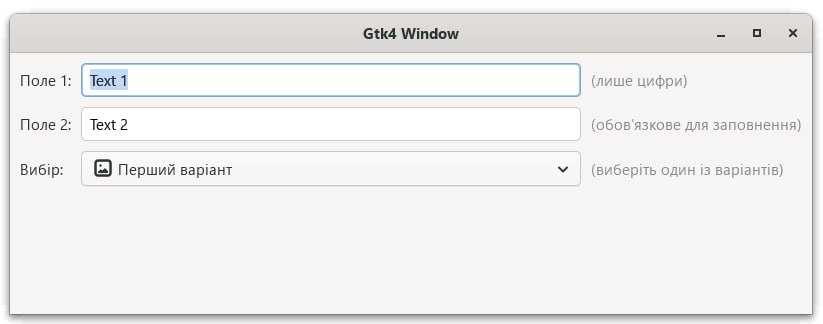
Приклад на GitHub
Для програмування використовую Visual Studio Code.
В програмі Visual Studio Code створюємо новий проект
dotnet new consoleДодаємо до проекту пакет GirCore.Gtk
dotnet add package GirCore.Gtk-4.0Запуск програми
dotnet runProgram.cs - Основний клас для запуску програми
using Gtk;

class Program
{
    private static readonly Application application = Application.New("ua.org.accounting.test", Gio.ApplicationFlags.FlagsNone);

    private static void Main()
    {
	//Задаємо шлях до бібіліотек Gtk
	//Якщо шлях до бібіліотек Gtk заданий в змінних оточення Windows, цей рядок можна закоментувати
        Native.SetMsysDirectory(@"C:\msys64\ucrt64\bin");

        application.OnActivate += (sender, args) =>
        {
            var window = Window.New();
            window.Application = application;
            window.Title = "Gtk4 Window";
            window.SetDefaultSize(300, 300);
            window.Child = CompositeBoxWidget.NewWithProperties([]);
            window.Show();
        };

        application.RunWithSynchronizationContext(null);
    }
}
Native.cs - Для Windows реєструє шлях до бібліотек Gtk
using System.Runtime.InteropServices;

static class Native
{
    public static void SetMsysDirectory(string path)
    {
        //Для Windows реєструється шлях до бібліотек Gtk
        if (OperatingSystem.IsWindows())
            if (Directory.Exists(path))
            {
                if (!NativeMethods.SetDllDirectory(path))
                    Console.WriteLine("Warning: Failed to set DLL directory.");
            }
            else
                Console.WriteLine($"Warning: MSYS2 path not found at {path}");
    }
}

internal static partial class NativeMethods
{
    [LibraryImport("kernel32.dll", EntryPoint = "SetDllDirectoryW", StringMarshalling = StringMarshalling.Utf16, SetLastError = true)]
    [return: MarshalAs(UnmanagedType.Bool)]
    public static partial bool SetDllDirectory(string lpPathName);
}
Item.cs - Клас для моделі випадаючого списку DropDown
using GObject;

[Subclass<GObject.Object>()]
public partial class Item
{
    public string Id { get; set; }
    public string Name { get; set; }

    public static Item New() => NewWithProperties([]);

    public static Item New(string id, string name)
    {
        Item myCustomItem = NewWithProperties([]);
        myCustomItem.Id = id;
        myCustomItem.Name = name;

        return myCustomItem;
    }
}
DropDownBoxWidget.ui - Шаблон для рядка випадаючого списку DropDown
<?xml version="1.0" encoding="UTF-8"?>
<interface>
    <template class="DropDownBoxWidget" parent="GtkBox">
        <property name="orientation">horizontal</property>
        <property name="spacing">5</property>
        <property name="margin-start">2</property>
        <property name="margin-end">2</property>
        <property name="margin-top">2</property>
        <property name="margin-bottom">2</property>

        <child>
            <object class="GtkImage" id="item_image">
                <property name="icon-name">image-x-generic-symbolic</property>
                <property name="pixel-size">20</property>
            </object>
        </child>

        <child>
            <object class="GtkLabel" id="item_label">
                <property name="hexpand">true</property>
                <property name="halign">start</property>
            </object>
        </child>

    </template>
</interface>
DropDownBoxWidget.cs - Рядок випадаючого списку DropDown
using Gtk;
using GObject;

[Subclass<Box>("DropDownBoxWidget")]
[Template<AssemblyResource>("DropDownBoxWidget.ui")]
public partial class DropDownBoxWidget
{
    [Connect("item_label")] Label item_label;

    public static DropDownBoxWidget NewWithParam(string text)
    {
        DropDownBoxWidget w = NewWithProperties([]);
        w.item_label.SetText(text);
        return w;
    }

    public void SetText(string text) => item_label.SetText(text);
}
CompositeBoxWidget.ui - Шаблон для вікна
<?xml version="1.0" encoding="UTF-8"?>
<interface>
    <template class="CompositeBoxWidget" parent="GtkBox">
        <property name="orientation">vertical</property>
        <property name="margin-start">10</property>
        <property name="margin-end">10</property>
        <property name="margin-top">10</property>
        <property name="margin-bottom">10</property>

        <child>
            <object class="GtkGrid" id="my_grid">
                <property name="column-spacing">10</property>
                <property name="row-spacing">10</property>

                <!-- Рядок 0 -->
                <child>
                    <object class="GtkLabel">
                        <property name="label">Поле 1:</property>
                        <property name="halign">start</property>
                        <layout>
                            <property name="column">0</property>
                            <property name="row">0</property>
                        </layout>
                    </object>
                </child>
                <child>
                    <object class="GtkEntry" id="entry1">
                        <property name="width-request">500</property>
                        <layout>
                            <property name="column">1</property>
                            <property name="row">0</property>
                        </layout>
                    </object>
                </child>
                <child>
                    <object class="GtkLabel">
                        <property name="label">(лише цифри)</property>
                        <property name="halign">start</property>
                        <style>
                            <class name="dim-label"/>
                        </style>
                        <layout>
                            <property name="column">2</property>
                            <property name="row">0</property>
                        </layout>
                    </object>
                </child>

                <!-- Рядок 1 -->
                <child>
                    <object class="GtkLabel">
                        <property name="label">Поле 2:</property>
                        <property name="halign">start</property>
                        <layout>
                            <property name="column">0</property>
                            <property name="row">1</property>
                        </layout>
                    </object>
                </child>
                <child>
                    <object class="GtkEntry" id="entry2">
                        <property name="width-request">500</property>
                        <layout>
                            <property name="column">1</property>
                            <property name="row">1</property>
                        </layout>
                    </object>
                </child>
                <child>
                    <object class="GtkLabel">
                        <property name="label">(обов'язкове для заповнення)</property>
                        <property name="halign">start</property>
                        <style>
                            <class name="dim-label"/>
                        </style>
                        <layout>
                            <property name="column">2</property>
                            <property name="row">1</property>
                        </layout>
                    </object>
                </child>

                <!-- Рядок 2 (Dropdown) -->
                <child>
                    <object class="GtkLabel">
                        <property name="label">Вибір:</property>
                        <property name="halign">start</property>
                        <layout>
                            <property name="column">0</property>
                            <property name="row">2</property>
                        </layout>
                    </object>
                </child>
                <child>
                    <object class="GtkDropDown" id="dropdown">
                        <property name="width-request">300</property>
                        <layout>
                            <property name="column">1</property>
                            <property name="row">2</property>
                        </layout>
                    </object>
                </child>
                <child>
                    <object class="GtkLabel">
                        <property name="label">(виберіть один із варіантів)</property>
                        <property name="halign">start</property>
                        <style>
                            <class name="dim-label"/>
                        </style>
                        <layout>
                            <property name="column">2</property>
                            <property name="row">2</property>
                        </layout>
                    </object>
                </child>
            </object>
        </child>

    </template>
</interface>
CompositeBoxWidget.cs - Вікно
using Gtk;
using GObject;

[Subclass<Box>("CompositeBoxWidget")]
[Template<AssemblyResource>("CompositeBoxWidget.ui")]
public partial class CompositeBoxWidget
{
    [Connect("entry1")] Entry entry1;
    [Connect("entry2")] Entry entry2;
    [Connect("dropdown")] DropDown dropDown;

    partial void Initialize()
    {
        entry1.SetText("Text 1");
        entry2.SetText("Text 2");

        Gio.ListStore store = Gio.ListStore.New<Item>();
        store.Append(Item.New("id1", "Перший варіант"));
        store.Append(Item.New("id2", "Другий варіант"));
        store.Append(Item.New("id3", "Третій варіант"));
        store.Append(Item.New("id4", "Четвертий варіант"));
        store.Append(Item.New("id5", "П'ятий варіант"));

        dropDown.Model = store;

        //Фабрика
        {
            var factory = SignalListItemFactory.New();
            factory.OnSetup += (sender, args) =>
            {
                if (args.Object is not ListItem listItem) return;
                DropDownBoxWidget dd = DropDownBoxWidget.NewWithParam(string.Empty);

                listItem.Child = dd;
            };
            factory.OnBind += (sender, args) =>
            {
                if (args.Object is not ListItem listItem) return;
                if (listItem.Child is not DropDownBoxWidget dd) return;
                if (listItem.Item is not Item item) return;

                dd.SetText(item.Name);
            };
            dropDown.Factory = factory;
        }

        dropDown.OnNotify += (sender, e) =>
        {
            if (e.Pspec.GetName() == "selected" && dropDown.SelectedItem is Item item)
                Console.WriteLine($"ID = {item.Id}, Назва = {item.Name}");
        };
    }
}
CompositeTemplate.csproj - Файл проекту
<Project Sdk="Microsoft.NET.Sdk">

  <PropertyGroup>
    <OutputType>Exe</OutputType>
    <TargetFramework>net10.0</TargetFramework>
    <ImplicitUsings>enable</ImplicitUsings>
    <Nullable>enable</Nullable>
    <AllowUnsafeBlocks>true</AllowUnsafeBlocks>
    <SatelliteResourceLanguages>en;uk;ru</SatelliteResourceLanguages>

  </PropertyGroup>

  <ItemGroup>
    <None Remove="**\*.ui" />
    <EmbeddedResource Include="**\*.ui">
      <LogicalName>%(Filename)%(Extension)</LogicalName>
    </EmbeddedResource>
  </ItemGroup>

  <ItemGroup>
    <PackageReference Include="GirCore.Gtk-4.0" Version="0.8.1" />
  </ItemGroup>

</Project>
Довідка: Як встановити Gtk4 для Linux та Windows
Gtk4 - кросплатформовий набір інструментів для створення графічних інтерфейсів користувача
Gir.Core - обгортка над бібліотеками Gtk4 для мови програмування C#
Visual Studio Code
Віджети Gtk 4
NuGet пакет GirCore.Gtk-4.0
Приклад на GitHub